MERN stack web development means building an application with MongoDB, Express, React, and Node.js: four JavaScript technologies that cover the database, the backend, and the frontend of a web app in a single language. It is one of the most common choices for teams that need a dynamic, data-driven product without stitching together tools written in different languages.
This guide breaks down how a MERN application actually works, how to build one, what it costs, and when it earns its place over another stack. We build MERN applications at Fivecube, and the details here come from that experience, not just the marketing copy on each technology's homepage. If you are comparing MERN against other options entirely, it is worth reading alongside our breakdown of full-stack development approaches more broadly.
What Is MERN Stack Web Development?
Each letter in MERN maps to one layer of the application, and all four run on JavaScript, which is the stack's whole appeal: no context-switching between languages as code moves from the browser to the server to the database.
MongoDB stores data as JSON-like documents instead of rows in a table. That schema flexibility makes it easy to change your data model as a product evolves, and because the documents are already JSON, there is no translation layer between what the database stores and what JavaScript code expects.
Express is a lightweight framework that runs on Node.js and handles routing, middleware, and the API layer. It is less a framework in the opinionated sense and more a thin, well-tested layer that gets out of the way.
React builds the user interface out of reusable components and re-renders only the parts of the page that actually changed. It is the piece most product teams already have opinions about, since it also powers a large share of the web outside the MERN world.
Node.js runs JavaScript outside the browser, on the server. Its event-driven, non-blocking model is well suited to applications that handle many simultaneous connections, such as chat tools or live dashboards.
How a MERN Application Works
A MERN app is organized into three layers that talk to each other in a predictable sequence. The presentation layer, built with React, is what the user sees and interacts with. The application layer, running Express on Node.js, processes requests and contains the business logic. The database layer, powered by MongoDB, stores the data and returns it on request.
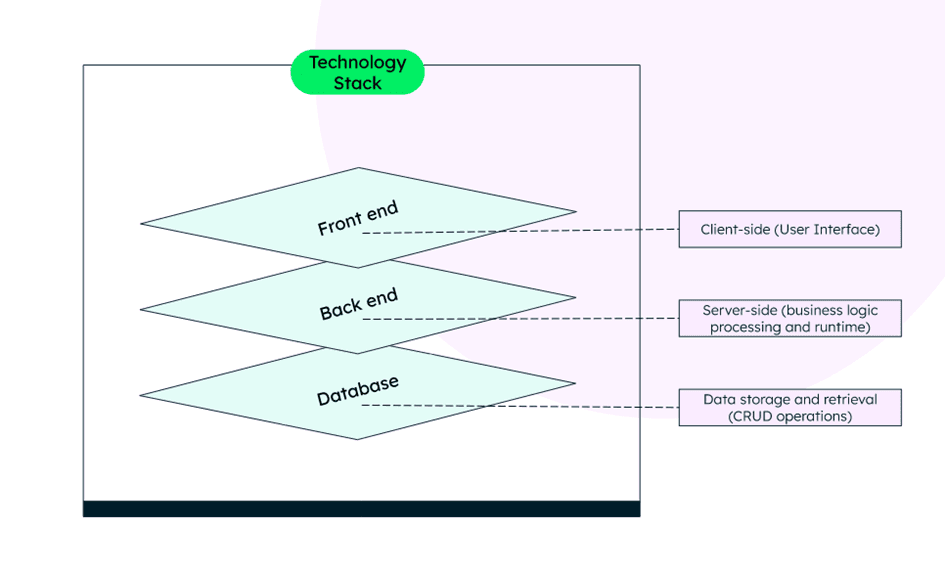
A typical request follows this path: the React interface captures a user action and sends an HTTP request to the Express API. Express validates the request, applies whatever logic the route requires, and queries MongoDB, usually through an object modeling library like Mongoose. MongoDB returns the result, Express formats a response, and React updates the interface without a full page reload.
Because each layer runs independently, they also scale independently. A traffic spike on the frontend does not require touching the database, and a MongoDB cluster can be resized without redeploying the API. That separation is one of the quieter reasons teams pick MERN for products they expect to grow, rather than just for how quickly it gets a first version out the door.
Building a Data-Heavy Web App?
Fivecube designs and develops MERN applications end to end, from architecture to deployment, for teams that need a dynamic, scalable product.
How to Build a MERN Application
The exact steps shift slightly with tooling, but the underlying sequence has stayed consistent:
Set up the database layer. Create a MongoDB Atlas cluster, define your collections, and connect it to the project with a connection string stored as an environment variable, never hardcoded.
Scaffold the backend. Install Express, Mongoose, and dotenv, then define schema models that mirror the data your application needs.
Build the API. Write RESTful routes (or a GraphQL layer, if the project calls for it) to handle the CRUD operations your frontend will call.
Scaffold the frontend. Most teams now spin up React with Vite rather than Create React App, since it starts faster and has a lighter build step.
Connect client to server. Use Axios or the native fetch API to call your Express endpoints from React components, and handle loading and error states explicitly rather than assuming every request succeeds.
Add authentication. MERN has no built-in auth, so this step usually means integrating a library like Passport.js or a third-party provider such as Auth0 or Clerk.
Test and deploy. Run the app against production-like data before launch, then deploy the frontend and backend, commonly to Vercel or Netlify for React and Render, Railway, or a container platform for the Express API.
Skipping the testing step is the most common shortcut we see go wrong. A MERN app that works perfectly with ten seed records can behave very differently once a collection has real production volume, especially if queries were not indexed with that volume in mind.
The other recurring mistake happens earlier: teams design the MongoDB schema around what is easiest to build first, rather than around how the application will actually query the data later. MongoDB's flexibility makes it forgiving in the short term, but a document structure that was never designed for the reports or filters a product ends up needing usually means a painful migration a year in. Sketching out the app's main queries before writing the schema catches most of that risk early.
MERN Development: Pros and Cons
Pros
A single language across the stack means a developer who knows JavaScript can move between frontend and backend work without relearning syntax, which speeds up debugging and code reuse. All four technologies are open source, well documented, and backed by large communities, so most problems have already been solved by someone else. React's component model and MongoDB's flexible schema both favor fast iteration, which matters when a product's requirements are still settling. Node's event-driven architecture also makes MERN a strong fit for real-time features like live notifications or collaborative editing. And because every layer deploys independently to standard cloud infrastructure, MERN apps run comfortably on AWS, Google Cloud, Azure, or smaller platforms like Render without any stack-specific hosting requirements.
Cons
The same language everywhere does not mean the same skill level everywhere. A developer still needs to understand MongoDB's document model, Express middleware, and React state management as genuinely different disciplines, not one skill repeated four times. MongoDB is not built for relational data, so an application with heavy joins or strict transactional requirements will fight the database rather than benefit from it. MERN apps are also client-side rendered by default, which creates real SEO and initial-load-performance tradeoffs unless you add server-side rendering with a framework like Next.js on top. And since authentication is not built in, security has to be deliberately engineered rather than assumed. State management is the other quiet cost: a small app can get by with React's built-in tools, but a growing app with deeply nested components usually needs a dedicated library, and retrofitting one onto an app that skipped this decision early is more work than choosing one upfront.
When MERN Is the Right Choice
MERN tends to earn its place on projects that share a few traits: a data-driven interface that updates frequently, a need to move fast without waiting on separate frontend and backend teams to sync, and a product shape that benefits from a flexible schema rather than a fixed relational one. In practice, that plays out most often in four kinds of projects.
Real-time collaboration tools
Shared dashboards, project trackers, and in-app chat all depend on pushing updates to multiple users at once. Node's event-driven model handles that concurrency well without the heavier infrastructure a different stack might need.
Social platforms and community tools
User-generated content rarely fits a fixed schema for long. MongoDB's flexible documents absorb new content types and fields without a disruptive migration every time the product adds a feature.
Fintech and internal business tools
Dynamic dashboards that surface live data benefit from React's re-rendering model, and a MERN backend keeps the API layer light enough to add new endpoints as reporting needs change.
Aggregators
News, listings, and comparison platforms that pull data from multiple sources and reshape it into one interface play to MongoDB's strength at storing inconsistent, semi-structured records without forcing them into a rigid table first.
If your project is closer to a content-heavy marketing site than an interactive product, a CMS-backed site or a builder like Webflow is usually a better fit than a custom MERN build. And if you are choosing between MERN and its closest relatives, our guide to full-stack MERN development covers how MEAN, MEVN, and PERN compare.
What MERN Development Actually Costs
Cost tracks complexity more than it tracks the stack itself. A lean MVP with a handful of screens, standard CRUD functionality, and one or two integrations is the cheapest version of a MERN build, since most of the effort goes into the application logic rather than infrastructure. Add real-time features, complex permission systems, third-party integrations beyond a simple API call, or a design system that needs custom component work, and the estimate climbs accordingly.
What drives the price
The variables that move a quote the most are the number of user roles and permission levels, whether the app needs real-time updates versus periodic refreshes, how much of the UI is custom versus built from an existing component library, and the depth of testing and QA the project requires before launch. A straightforward internal tool and a customer-facing fintech dashboard can both be built in MERN, but the second one costs several times more because of compliance, security review, and the cost of a bug reaching a real customer.
Teams that scope the project tightly before development starts, with a clear list of what is in the first release and what is deferred, consistently get more accurate quotes than teams that start with an open-ended "build us an app like X."
Cost after launch
Cost does not stop at launch, either. A MERN application needs ongoing hosting for the database and the API, monitoring, dependency updates, and the occasional refactor as the codebase grows. Budgeting a smaller, recurring maintenance line alongside the initial build avoids the common surprise of a fast, cheap launch followed by an expensive scramble six months later when a dependency update breaks something nobody was watching.
A Simple Request/Response Example
Picture a user updating their phone number on a MERN-powered account page. Here is what happens between the click and the confirmation message:
The React form captures the new value and sends an HTTP request to the Express API, with the updated phone number as a parameter. Express receives the request, validates the input against the expected schema, and maps it to the corresponding field in MongoDB using Mongoose. MongoDB updates the record and returns a success or failure response. Express passes that response back to React, which then shows a confirmation message or an error, depending on what came back.
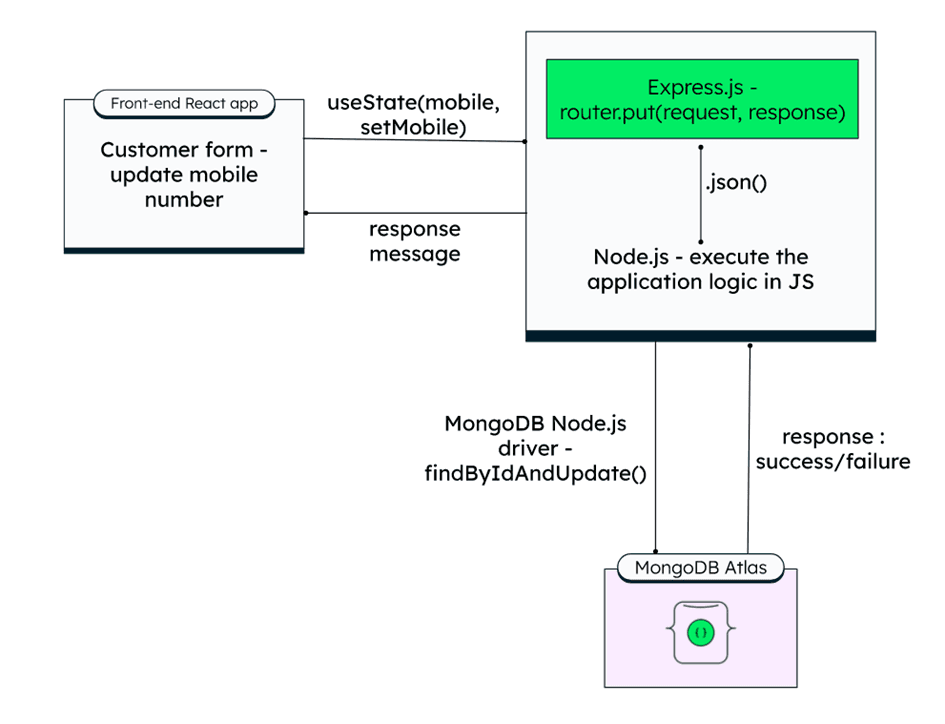
Nothing in that flow is unique to phone numbers. The same pattern (capture input, validate, write to the database, confirm back to the user) covers most CRUD interactions in a MERN application, which is part of why the stack feels consistent once you have built one feature end to end.
By
Fivecube Team
Frequently Asked Questions
Is the MERN stack good for web development?
Yes, for the right project. It excels at dynamic, data-driven applications with a JavaScript team already in place. It is a weaker fit for relational-data-heavy systems or SEO-critical content sites, where a different stack or an added server-side rendering layer makes more sense. The honest answer depends more on what you are building than on any general strength or weakness of the stack itself.
What is the MERN stack used for?
MERN is most commonly used for single-page applications, dashboards, and CRUD-heavy products: think project management tools, social platforms, booking systems, and internal business tools that need a responsive, component-based interface.
Is MERN stack still relevant in 2026?
Yes. MongoDB, Express, React, and Node.js all remain actively maintained and widely used, and React in particular continues to anchor a large share of production frontend work. The stack has evolved around the edges (Vite instead of Create React App, Atlas instead of self-hosted MongoDB) more than it has been replaced.
What is the difference between MERN and MEAN?
The two stacks are identical except for the frontend layer: MERN uses React, MEAN uses Angular. The choice usually comes down to team familiarity and whether the project favors React's flexibility or Angular's more opinionated, batteries-included structure.
Does a MERN app need a separate mobile app?
Not necessarily. A MERN web app can be made responsive for mobile browsers, and if a native app is needed later, React Native reuses much of the same React knowledge and can share logic with the web frontend.
How much does MERN stack development cost?
It depends on scope more than on the stack itself. A simple MVP is the least expensive version of a MERN build, while real-time features, multiple user roles, and third-party integrations each add development and testing time that shows up in the final cost. Two products that both fit the description "MERN web app" can land a full order of magnitude apart once you account for compliance needs, design complexity, and how many integrations sit between the app and the outside world.
MERN stack web development works best when the project actually needs what the stack is good at: a dynamic interface, a flexible data model, and a team that can move fast in one language. Get the scope right before development starts, and MERN tends to deliver exactly the kind of fast, scalable application it is known for.

Want a tailored solution?
Let’s build something great together!