Poor UI/UX design can sink your product. Take MySpace as an example. While other factors were undeniably also at play, its cluttered product design did not help. It alienated users, motivating them to switch to MySpace's competitors.
Besides, UI/UX design impacts conversions as much as retention. Case in point: in e-commerce, improving the checkout design can boost conversion rates by 35%.
If your digital product is already on the market but some of its metrics leave much to be desired, chances are you need a product redesign. Here is how to decide whether that is your case, what the product redesign process looks like, and what to expect from the whole redesign, with real product redesign examples and ideas along the way.
TL;DR
A product redesign goes further than visual tweaks. Unlike a design refresh, it involves revising user flows, information architecture, and business logic.
Consider a redesign if you see low or declining conversion, retention, and engagement rates. Negative user feedback, expansion plans, technical issues, and compatibility issues with modern devices can also prompt one.
The product redesign process runs through defining needs and goals, identifying areas of improvement, wireframing and prototyping, validating and implementing the design, preparing users for the rollout, launching, and monitoring the outcomes.
Well known product redesign examples like Wikipedia, Slack, and Airbnb show that the biggest wins come from fixing user flows, not just refreshing visuals.
What Is a Product Redesign?
As a SaaS and Web3 product design studio, we often conduct UI/UX audits for our clients’ digital products. In our experience, these eight signs are the most common reasons to redesign a product:
Low or decreasing conversion and retention rates
Subpar user engagement rates
Negative user feedback that mentions poor design and usability issues
Outdated look and feel that undermines the brand’s image
Expansion plans clash with the existing design
Incompatibility with planned product updates
Misalignment with modern devices and design principles
Persisting technical issues, fixing which requires substantial changes in user flows
Product Redesign Process: 6 Steps for Success
A product redesign is the process of reworking an existing digital product's look, feel, and behavior to fix usability problems and hit business goals. The product redesign definition that matters here is behavioral, not cosmetic: you change how the product works, not only how it looks.
That is what separates a redesign from a design refresh. The table below shows the difference at a glance.
Design refresh | Product redesign
| |
|---|---|---|
What changes | Visual layer only: colors, fonts, icons, spacing | Look, feel, and behavior: user flows, IA, business logic, features |
Goal | Modernize the brand's appearance | Fix usability and move product metrics |
Effort | Low to medium | Medium to high |
Risk to users | Minimal | Higher, users must relearn parts of the interface |
If you only need to tweak the visual appearance while keeping the business logic, features, and user flows the same, that is a refresh. If you need profound changes in the look, feel, and behavior of the interface, including revised user flows and functionality, you are redesigning the product.
It's Time to Transform Your Product.
Don't let poor UI/UX sink your product. Trust your redesign to experts for guaranteed metric improvement.
8 Signs Your Product Needs a Redesign
As a SaaS and Web3 product design studio, we often conduct UI/UX audits for our clients' digital products. In our experience, these eight signs are the most common reasons to redesign a product, and the clearest signals that a product needs a UX revamp:
Low or decreasing conversion and retention rates
Subpar user engagement rates
Negative user feedback that mentions poor design and usability issues
Outdated look and feel that undermines the brand's image
Expansion plans clash with the existing design
Incompatibility with planned product updates
Misalignment with modern devices and design principles
Persisting technical issues, fixing which requires substantial changes in user flows
One or two of these on their own may only call for a refresh. When several stack up together, a full product redesign is usually the better investment.
Product Redesign Process: 6 Steps for Success
If one or several points above hit close to home, you probably need to redesign your product. A good product redesign process is as data-driven as it is creative. Here is what it takes, step by step.
1. Define Your Needs and Expectations
The first step in designing or redesigning a product is deciding why you are doing it. Why are you seeking product redesign services in the first place, and what are you striving to achieve?
Set clear, measurable goals so you can measure the return on your investment and guide the work of designers and developers. Those goals can focus on increasing customer lifetime value (CLV) or user retention, for example.
2. Pinpoint Areas of Improvement
You might have dozens of product redesign ideas, but you need to ground them in data before you commit. To identify what exactly needs improving:
Conduct user research. Use in-app surveys, session recording, heatmaps, and user interviews to identify issues.
Study the available product analytics. Analyze feature usage and conduct funnel and path analysis.
Audit the design. Have professionals evaluate your product design to catch key performance, UX, and functionality issues and pinpoint their root causes.
3. Create a Prototype
Bring together all your findings, insights, and ideas and turn them into wireframes and prototypes. A design team starts with wireframes, which visualize page layouts and user flows, and moves to low- and high-fidelity prototypes.
4. Iterate, Validate, and Hand Off Your Redesign
Have stakeholders review the product's prototypes and conduct user testing to collect feedback. Based on that feedback, iterate your redesign until it is intuitive and frictionless. In later iterations, you can also roll out the redesign to a small group of existing users to measure real-world impact.
A word of caution here: the strongest redesigns are evolutions, not revolutions. Rather than shipping a full overhaul at once, start with small, high-impact changes, validate each with real users, and scale only what works. A big-bang rewrite raises the risk that the new version feels like a downgrade, and users will not stick around for that.
Once the prototypes receive the final approval, hand them over to developers for implementation.
5. Prepare Your Users
Redesigns are inherently frustrating to some users. They have to adapt to new navigation patterns, unfamiliar workflows, and unusual element placements. So prepare users for those changes by:
Creating a sequence of communications announcing the changes and how they will benefit users
Adding in-app messages to prompt users to try new features
Setting up onboarding flows to help users quickly get their bearings within the new interface
6. Launch and Monitor
With your design ready, roll it out and keep track of the key success metrics. Ensure those metrics are directly related to the goals you set in step 1, and track them for each user segment separately. The metrics worth watching after a redesign usually include:
Conversion rate. Are more users completing the key actions the redesign was meant to unblock?
Retention. Do users come back, or did the change disrupt their habits?
Engagement. Feature usage, active sessions, and depth of use.
Bounce and drop-off rates. Where users still leave or abandon a flow.
Organic search traffic. A signal of whether structural and performance changes helped or hurt.
Compare these against your pre-redesign baseline. A redesign is not done at launch, it is done once the metrics confirm it worked.
Product Redesign Examples
Some of the most cited product redesign examples come from products you use every day. What they have in common is that the redesign fixed how the product worked, not just how it looked.
Product | What the redesign changed | Result
|
|---|---|---|
Wikipedia (2023 desktop) | Sticky header, collapsible sidebar, improved search with visual suggestions | 30% more searches and 15% less scrolling in testing |
Slack | Reorganized the mobile tab bar from five items to three, consolidated desktop tabs | Less clutter and fewer context switches in daily workflows |
Airbnb (2025 rebuild) | Moved from a rental marketplace to an experience-led platform, unified navigation, softer visual language | Broader offering and a more consistent experience across devices |
The pattern behind the numbers is consistent: the redesigns that moved metrics fixed navigation, flows, and clarity, not just visuals. In agency case studies the same holds, with reworked UX helping products close funding rounds and multiply their paying user base.
Product Redesign in Practice at Fivecube
At Fivecube, we have had our fair share of product redesign projects. Here are a couple of examples from our own work.
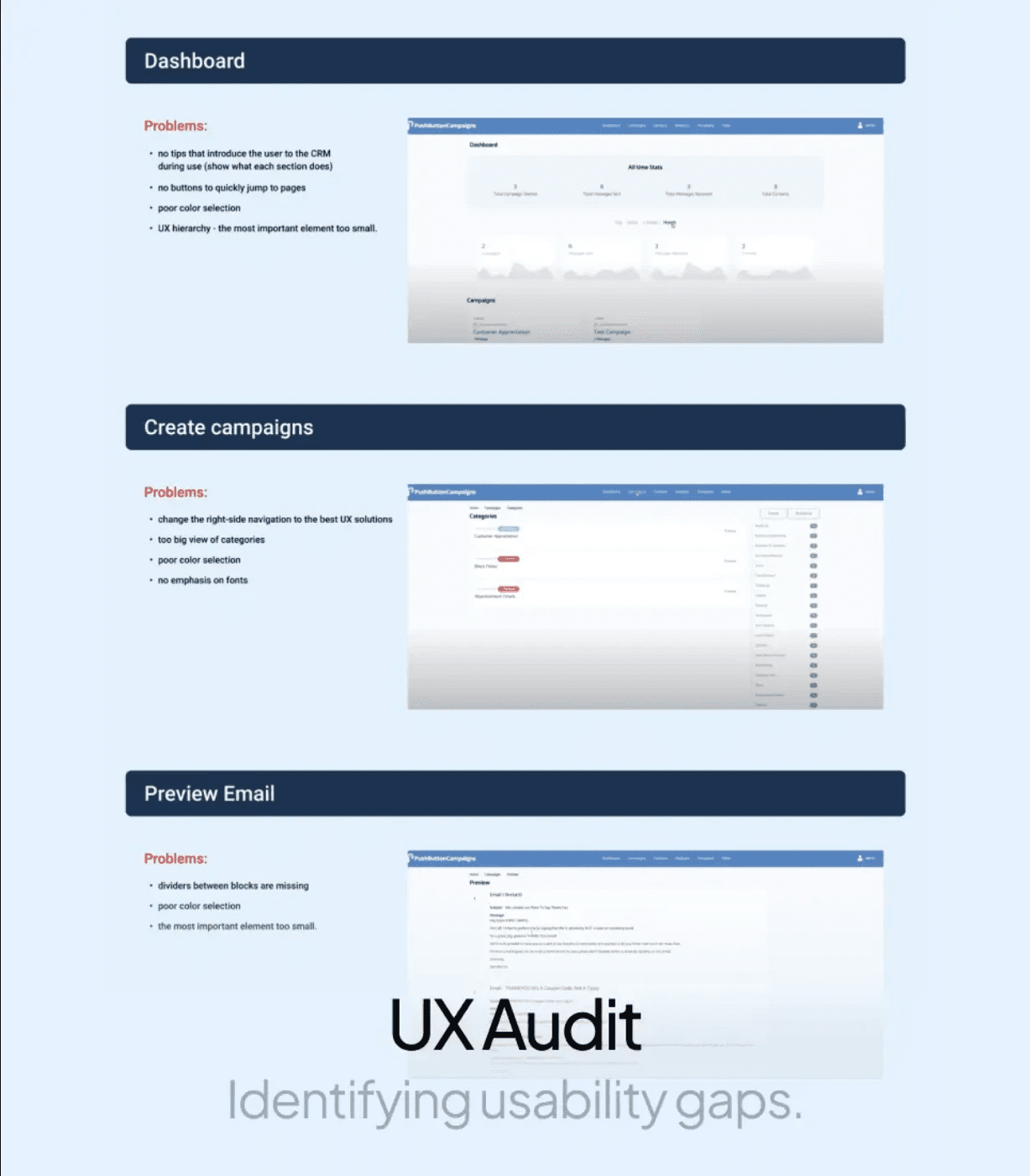
CampaignWired, a CRM-like platform, sought our help to improve the overall user experience. We conducted a thorough UI/UX audit and user research to identify usability gaps and pinpoint areas of improvement. Based on our findings, we prepared a new information architecture and revamped user flows to make them more intuitive.
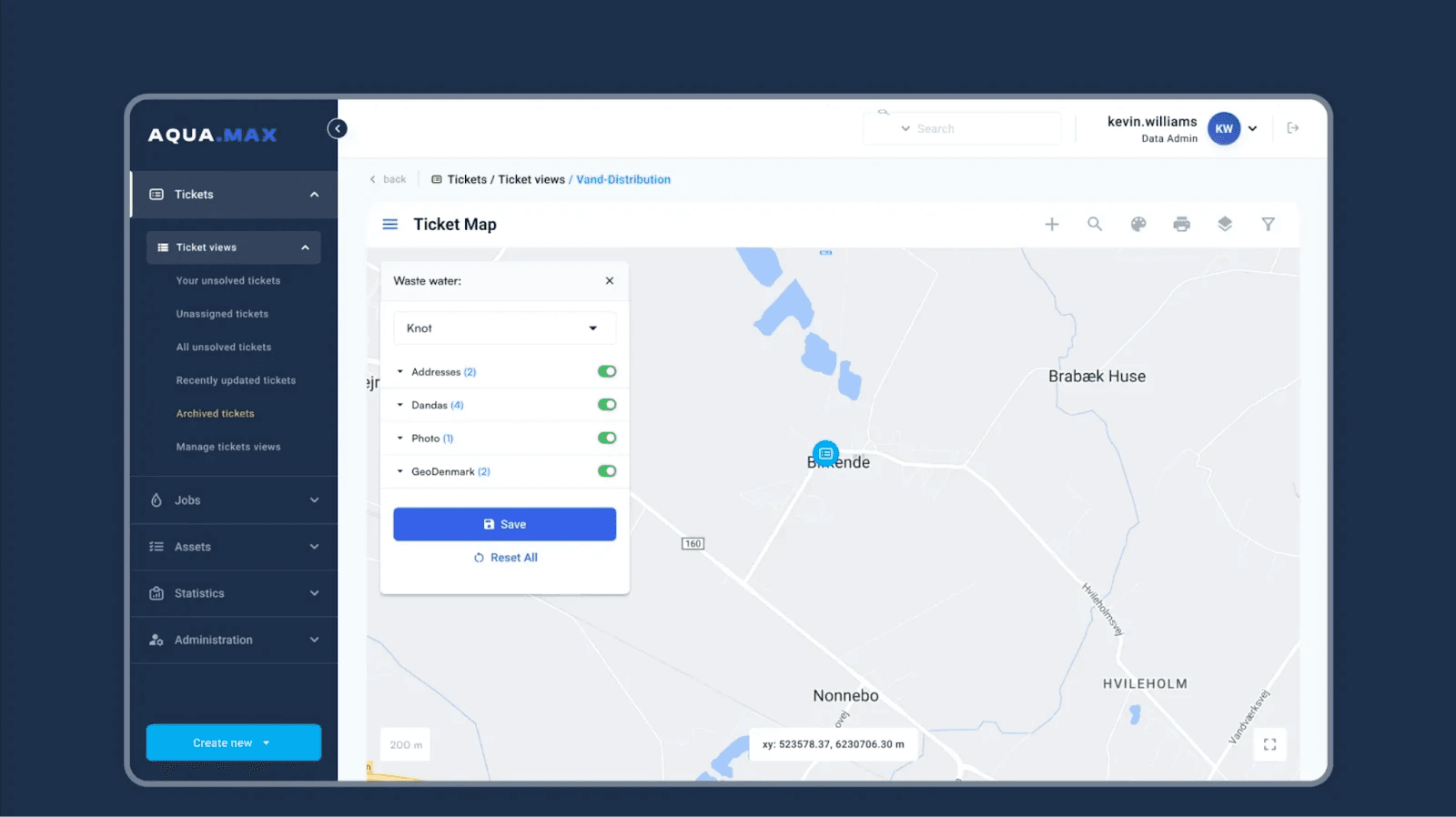
AquaMax came to us with a request to align its supply chain platform's design with Google Material Design 3. To redesign the platform, we relied on UX research to create user personas and revamp the information architecture, closing usability gaps in the process.
Product Redesign Ideas to Prioritize First
When teams brainstorm product redesign ideas, the list often gets long fast. To decide what to redesign first, focus on the areas that move metrics and touch the most users:
The onboarding flow. First-run experience shapes activation and early retention.
High-drop-off funnels. Checkout, sign-up, and upgrade paths where you lose users.
Core daily workflows. The three or four screens power users touch most often.
Navigation and information architecture. If people cannot find features, they will not use them.
Mobile and responsive views. Especially if the product predates modern device sizes.
Rank these by expected impact against effort, then validate the top candidates with data before committing design time.
How to Avoid Common Redesign Mistakes
Redesigning on opinion, not data. Anchor every change in research and analytics.
Changing too much at once. Big-bang redesigns raise risk. Roll out to a segment first.
Ignoring existing users. Communicate changes early and support the transition.
Skipping post-launch monitoring. The redesign is not done at launch, it is done once the metrics confirm it worked.
Final Thoughts
Once the redesign is live, your job is not done. Even the most rigorously validated designs still need tweaking after they end up in front of real-world users. So keep an eye on incoming feedback and insights from product analytics to refine your design further.
Hesitating to get into your first product redesign? We have done enough UX audits and product redesigns to make sure yours goes smoothly and achieves the defined goals. Reach out to our experts to discuss your product in more depth.
By
Fivecube Team
Frequently Asked Questions
What is a product redesign?
A product redesign is a reworking of an existing digital product's look, feel, and behavior, including its user flows, information architecture, and business logic, to fix usability issues and improve business metrics.
What is the difference between a redesign and a design refresh?
A refresh changes only the visual layer, such as colors, fonts, and icons. A redesign changes how the product behaves, including flows, features, and structure.
What is the first step in redesigning a product?
Define why you are doing it. Set clear, measurable goals before touching the interface, so every later decision can be validated against them.
How long does a product redesign take?
It depends on scope. A focused flow redesign can take a few weeks, while a full platform redesign with research, prototyping, and phased rollout can run several months.
Previous Article
Next Article
Want a tailored solution?
Let’s build something great together!